How to use this site
5 Planning & treatment rosters
Two grids, two different answers to “may I change this?” Signed in as staff:
| Page | As staff you can | Set by |
|---|---|---|
| Planning roster | Read it. The shifts, the relieving and the day's remark are not yours to change — the page opens read-only and there is no Lock button on it for you. | Senior / admin |
| Treatment machine roster | Run it — operating hours, staff bands, off / AL / SL, the day's remark, batch assign, and the reset. This is the sheet the machine i/c keeps. | You |
| Duty board, leave & duty list, holiday board | Read them. They are the department's record. | Admin |
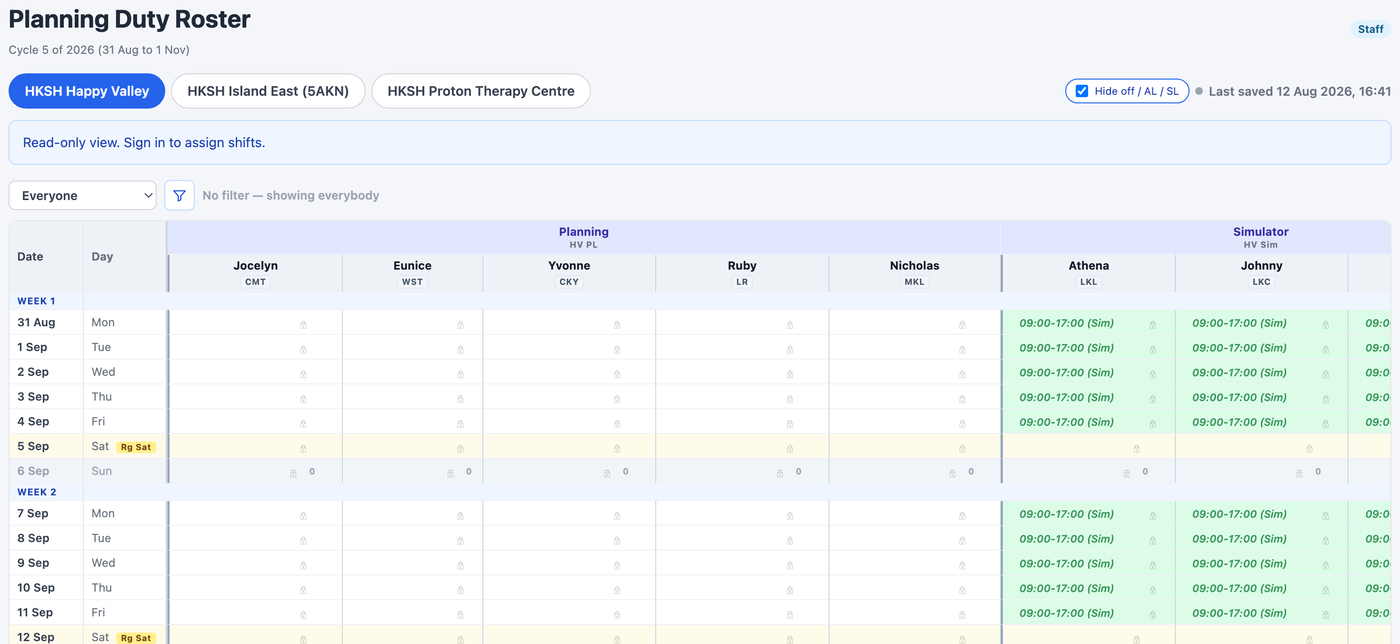
The blue bar on the planning roster says “Read-only view. Sign in to assign shifts” even when you are already signed in as staff. Nothing is wrong: it is the page's way of saying the shifts are not yours to set. Read it, work to it, and raise a request if a day on it needs to change.
Both rosters show one centre at a time — the tabs across the top are the centres, and on the treatment roster a second row of tabs picks the machine. Check you are on the right pair before you start typing.
And check the cycle. Beside the title of every roster page, on the same line, is a small pill for each cycle — Cycle 5, and the next one once it opens; the filled one is the nine weeks you are looking at. A cycle still being prepared is shown only to the admin until it is settled, so you may see a single pill. Each cycle is a separate sheet with its own hours, its own cover and its own lock, so typing into the wrong one changes a roster nobody is working to. It follows you from page to page until you switch it back.